Cyber Snipa Stinger mouse


Feature
We put Cyber Snipa's top gaming mouse, the Stinger, through the paces to see if it can measure up to the products of the established brands.
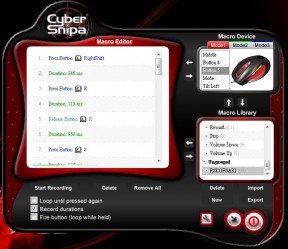
A big feature of the Stinger mouse is its customisability with the (included) macro editor. Every single button except the DPI changer and the left/right mouse buttons can be completely reconfigured to do almost anything you want them to. This is done in the Macro Editor, which is delivered with the mouse. We’ll take a look at this feature a bit later on.
Drivers
As mentioned before, the Stinger’s drivers are included with the mouse. While we found it a bit annoying that the mouse driver and the Macro Editor are two separate programs, this really is the only downside of both. The mouse driver itself is very straightforward, integrated into the OS’ normal mouse settings.
Furthermore, the DPI settings can be adjusted, along with the report rate (anywhere from 125-1000Hz) and the overall mouse speed. In case you mess anything up, there’s also a nice little tab for resetting everything back to factory settings.
Ratings
As usual, we’ve rated the Cyber Snipa Stinger mouse in five different categories.
Ergonomy 9
Buttons 7.5
Wheel 8.5
Customisability 8.5
Drivers 8.5
Overall 8.4
Overall, we’re very impressed by the Stinger mouse. While it has a few minor shortcomings, the fantastic feel and the great Macro Editor make this mouse a top contender. Small details, such as the included spare Teflon mouse feet, only bolster the good impression. In fact, Cyber Snipa’s flagship achieves a score of 8.4/10, just edging out the previous record holder, the Steelseries Ikari Laser. All in all, the Stinger mouse is definitely worth taking a look at if you’re in the market for a new gaming mouse.