Corsair Clipper Pro Mini 60 Gaming Keyboard

Feature
Design and Styling
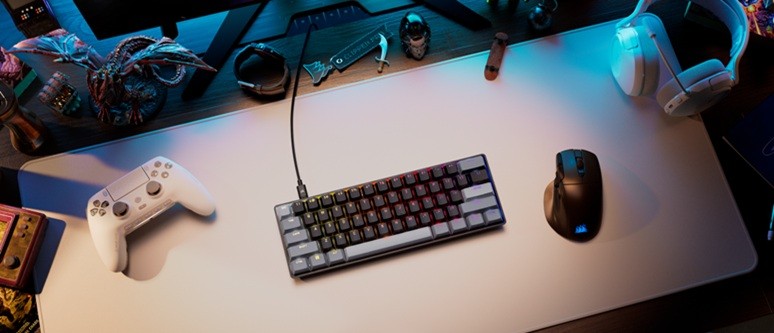
The first thing you will notice out of the box is that this is a 60% form factor keyboard, and it carries the physical footprint to prove it. It will save a significant amount of desk space, making it perfect for gamers who use large, sweeping mouse motions and need ample room to manoeuvre. It is incredibly lightweight and super portable, making it the ideal companion to throw into a bag and take away on a trip. Despite its diminutive size, the build quality feels robust, and it comes equipped with a high-quality braided USB Type-C cable and a highly practical waterproof and dust-resistant design. Additionally, it offers three height levels to help you find the optimal typing angle.
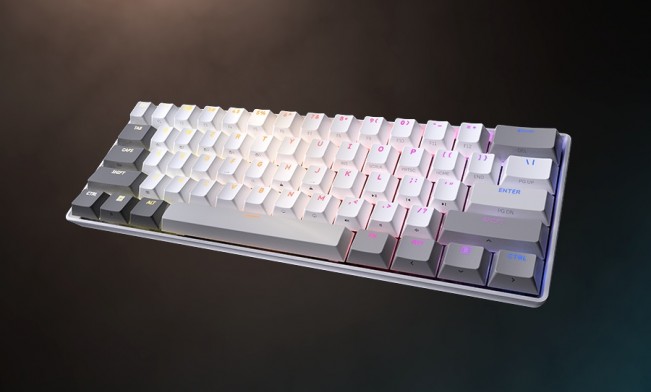
Straight off, I'm going to preface this article by saying that I generally prefer a full-sized keyboard - one with a dedicated numpad. My day job uses numbers...a lot, and as such, a keyboard with a numpad comes in especially handy. For those of us who use our gaming rigs for productivity or "day job" tasks, the loss of a dedicated number entry area is often a frustrating compromise.
The lack of a numpad aside, the major issue I have with the Clipper Pro Mini 60 is the lack of dedicated arrow keys. Yes, they are certainly there with the use of the function button, but having to use a secondary modifier just to navigate a document can feel like a chore. While the keyboard features beautiful per-key RGB functionality with loads of visual customization available right out of the gate, the absence of physical arrow keys is a notable hurdle for anyone looking to use this board for serious work outside of gaming.
Software and Customisation
To customize the keyboard's behaviour and lighting, Corsair utilizes the Corsair Webhub. This online platform allows users to customize each key to their exact style, handling everything from vibrant RGB lighting adjustments to the creation of macros and custom keybindings directly through your browser.
The software truly comes into its own when configuring the board's standout feature: adjustable keystrokes. Thanks to the internal hardware (primarily, the Corsair MGX Hyperdrive Core Hall Effect Mechanical Switches), a single key can be mapped to perform up to four distinct functions depending on how far it is pressed. Actions can be mapped to a half-press, full-press, half-release, and full-release. Not only can you adjust the exact actuation depth for each of these trigger points, but you can also configure whether an action is held continuously or performed just once. It is an incredibly powerful suite of options, though it can admittedly take some getting used to for people who generally press down hard on their keys at all times.
Performance
When it comes to the actual typing and gaming experience, the Clipper Pro Mini 60 feels remarkably unique. It utilizes Corsair's new MGX HYPERDRIVE CORE magnetic switches. Unlike traditional mechanical switches, these keys are not clicky like a Cherry MX Blue. Instead, they are super responsive and spring back beautifully, offering a smooth, linear travel that feels instantaneous.
Performance-wise, the keyboard is a powerhouse. The magnetic switches enable a "Rapid Trigger" feature, which resets the key the exact millisecond it begins moving upward, allowing for much quicker secondary inputs during intense firefights. Combined with the multi-actuation points, the level of physical customization you can achieve gives competitive gamers a genuine edge in titles where split-second reaction times matter most.
Verdict
If you want a keyboard for both gaming and work, I'd probably give this a miss, as the lack of a numpad and dedicated arrow keys drastically reduce overall productivity. However, as a pure gaming keyboard, the Corsair Clipper Pro Mini 60 is a superb device. The small footprint, the incredibly advanced multi-actuation points, and the sheer amount of customization options give gamers a definitive edge.
In the Box:
● Corsair Clipper Pro Mini 60 keyboard
● Braided USB Type-C cable
As always, follow Hooked Gamers on Instagram for news updates, reviews, competitions and more.